


User interfaces are the gateways to our applications. They need to be not only functional but also visually appealing and user-friendly. Here at RadSystems, the perfect UI is a combination of the right tools, your design vision, and a developer's skillset. RadSystems empowers you with the flexibility and functionality to create exceptional user experiences. We understand the importance of a robust UI toolkit. That's why we offer a variety of front-end framework options to empower you to craft the perfect UI for your next project.
Today, we'll be diving into a component showdown, comparing popular front-end frameworks available within RadSystems: Bootstrap vs. Vue.js. We'll explore their strengths, weaknesses, and ideal use cases, all with code snippets to illustrate the concepts.
Round 1: The Utility Champs - Bootstrap vs. Foundation

Let's start with some familiar faces. Bootstrap and Foundation are established players in the UI framework game, known for their extensive libraries of pre-built components and responsive design features. These frameworks are perfect for projects that require a quick and consistent UI foundation.
Bootstrap:
- Strengths: Beloved for its simplicity, vast component library (buttons, forms, navigation, etc.), and ease of learning. Integrating Bootstrap into your RadSystems project is a breeze!
- Weaknesses: While offering a high degree of customization, extensive customization can sometimes lead to a bloated codebase.
- Use Cases: Ideal for rapid prototyping, building basic to medium-complexity UIs, and situations where a clean and consistent design is essential.
Code Example (Bootstrap - Button):
HTML
<button type="button" class="btn btn-primary">Click me!</button>Foundation:
- Strengths: Offers a modular approach, allowing you to include only the components you need for a lightweight UI. This can be beneficial for performance optimization.
- Weaknesses: Generally has a steeper learning curve compared to Bootstrap, and the component library might not be as extensive.
- Use Cases: Perfect for building lightweight and performant UIs, especially for mobile-first applications
Code Example (Foundation - Button):
HTML
<button class="button">Click me!</button>Round 2: The Dynamic Duo - Vue.js vs. React
Now, let's delve into the world of more advanced frameworks. Vue.js and React are powerful tools for building dynamic and interactive user interfaces.
Vue.js:
- Strengths: Known for its approachable syntax, ease of integration with RadSystems, and ability to handle complex functionalities progressively. Vue.js offers a good balance between ease of use and control.
- Weaknesses: While rapidly growing, the ecosystem of third-party libraries might not be as vast as React's.
- Use Cases: Ideal for building complex single-page applications (SPAs), data-driven UIs, and situations where a balance between development speed and control is desired.
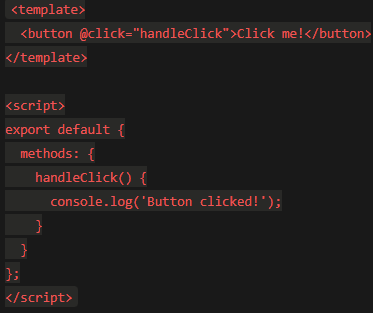
Code Example (Vue.js - Button with Click Event):
HTML
React:
- Strengths: A powerful library from Facebook, React boasts a vast ecosystem of third-party libraries and a large developer community. It's perfect for building highly interactive and scalable UIs.
- Weaknesses: React has a steeper learning curve compared to Vue.js and requires a deeper understanding of JavaScript concepts.
- Use Cases: Ideal for building complex and large-scale web applications, SPAs, and situations where performance and scalability are paramount.

The Takeaway: Choosing Your UI Weapon
The best framework for your project depends on your specific needs and preferences. Here's a quick cheat sheet to guide you:
- Need a quick start with pre-built components and a gentle learning curve? Bootstrap or Foundation.
- Building a dynamic and interactive UI with a balance between control and ease of use? Vue.js.
- Developing a large-scale and highly interactive application? React (be prepared to invest some learning time!).
Bonus Tip: RadSystems' beauty lies in its flexibility. You're not restricted to using a single framework throughout your project.
Think of your UI as a toolbox. Bootstrap provides the foundational components like buttons and navigation. Vue.js can then add interactivity and data-driven elements to specific sections of your application. This approach allows you to leverage the strengths of each framework for optimal results.
The RadSystems Advantage: Beyond Frameworks
While RadSystems offers diverse front-end frameworks, it goes beyond simply providing the tools. Here are some additional benefits you gain:
- Rapid Development: Pre-built components and code generation features within RadySystems significantly reduce development time, allowing you to focus on core functionalities.
- Reduced Coding Errors: Built-in functionalities and visual tools minimize the need for manual coding, leading to fewer errors and a cleaner codebase.
- Easy Maintenance: With a single codebase for various platforms (web, mobile, etc.), maintaining your application becomes a breeze.
P.S. What are your favorite RadSystems front-end frameworks? Share your experiences and project examples in the comments below! We'd love to hear from you 😊


